Strain Free

Unexplainable strain?

Your brain is responding to your screen.

Some users do not just feel “eye strain.” They feel subtly disturbed, foggy, sore-eyed, or unable to settle into work. Strain Free is built to help relieve the strain that is induced by modern display technology.

Screen comfort education

How Strain Free makes your screen healthier.

Click to learn how Strain Free helps.

Flicker-prone dimming

PWM and low hardware brightness

Some displays dim by pulsing the backlight. At low brightness, that pulsing can become harder for sensitive users to tolerate, even when the screen looks steady.

How Strain Free helps

PWM-safe software dimming

Strain Free can lower perceived brightness in software, helping users keep hardware brightness away from harsher low ranges while still working in dim rooms.

Pixel behavior

Temporal dithering

Dithering rapidly alternates nearby colors so the display can simulate more shades. For most people it is invisible; for some, it can feel like subtle motion or visual pressure.

How Strain Free helps

Steadier supported displays

On supported Apple Silicon Macs, Strain Free can apply display-level protection for temporal dithering and verify whether that protection remains active.

Light environment

Brightness mismatch

A bright screen in a dark room forces constant adaptation. Software brightness, warmth, and contrast reduction can make late-night work feel less abrupt.

How Strain Free helps

Profiles for the room

Extended brightness, warmth, and contrast controls let saved profiles match bright offices, dark rooms, and late-night writing without rebuilding settings each time.

Reading load

Text, scaling, and focus fatigue

Tiny text, fractional scaling, and heavy anti-aliasing can make reading feel effortful. Comfort is partly about reducing the work your eyes do all day.

How Strain Free helps

Readable comfort tuning

Strain Free keeps fine tuning visible so users can compare profiles, experiment with calmer contrast, and settle on display settings that make reading feel easier.

Body behavior

Blink rate drops during focus

People blink less when concentrating on screens. Local blink awareness can reveal when a session is getting dry or intense without sending camera data anywhere.

How Strain Free helps

Private blink awareness

Blink detection is a novel way of measuring how often you're blinking. We locally use your camera to log each blink with negligible battery drain.

Near focus

Your eyes need distance

Long sessions lock the eyes into near focus. Optional breaks are there for users who want reminders, and they disappear when users prefer pure display control.

How Strain Free helps

Optional rest cues

Break reminders can be turned on, which follow the 20/20/20 rule, helping you be proactive about adjusting your focus, relieving eye strain.

Comfort profiles

Fine tune your display settings, and instantly switch between different healthy presets.

Strain Free keeps the most useful adjustments close at hand: software brightness, warmth, contrast softness, PWM-safe dimming, and saved profiles for the rooms and work sessions you return to.

Software brightness 96%

Dim the screen in software while keeping hardware brightness away from harsher low ranges.

Warmth 24%

Move from neutral color work into deeper evening amber when the room gets dark.

Contrast softness 14%

Reduce edge intensity without burying text or making the interface feel washed out.

Saved profiles

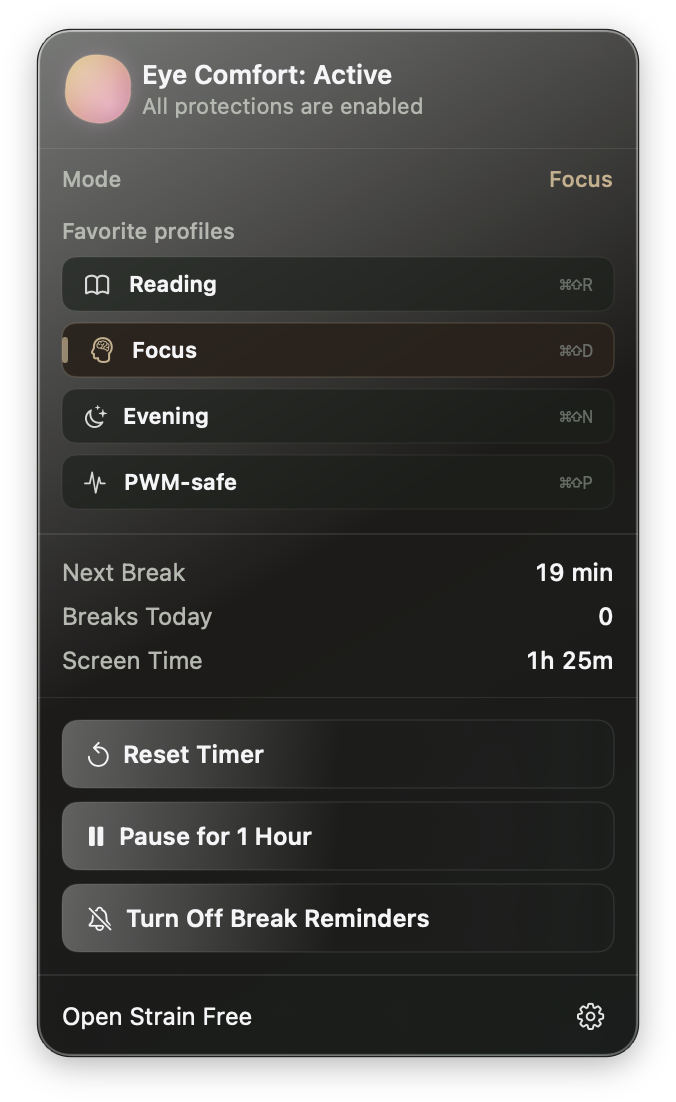
Save the combinations that feel right, then return to them from the menu bar.

Native Mac app

Strain Free integrates as a native macOS application.

Tune the display from the main window, watch blink rhythm only when you opt in, and keep favorite profiles one click away from the menu bar.

Early adopter price $9.99

Pay once. Lifetime support and updates.

Includes a 3-day trial. Launch price planned at $14.99.

  • Strain Free for Mac
  • Display protections and PWM-safe dimming
  • Comfort profiles, saved profiles, and menu bar favorites
  • Blink detection and optional break reminders
  • Lifetime Support and Updates
Buy Early Access

Secure checkout through Paddle.

Questions

FAQ

About the creator

Built from a personal relationship with screens.

This section will share the story behind Strain Free: my own experience with screen discomfort, the many display settings and workflows I tried, and why I wanted to build a calmer Mac utility for people who feel unusually affected by modern screens.

Read the story